Feed Google's AI the signal it is missing
Improve lead quality with value-based bidding.
Pass predicted lead values back to Google Ads, so Smart Bidding goes after the prospects who actually pay. Values come from your own CRM history, and none of it is stored.
What Google gets today
What it could get
A shape, not your data.
- Built for pipeline revenue
- Works with HubSpot, Google Sheets or any CSV
- Values sent straight to Google Ads
- Built by an ex-Googler
How it works
From your closed deals to Google's bidding
- 1
Measure
Upload a CRM export. AI reads your columns and your description of a good lead, then the values come from your own win rates and deal sizes. Nothing invented.
- 2
Connect
Connect Google Ads. One conversion action is created and every lead is sent to it with its own value, new ones as they arrive.
- 3
Prove
It keeps reading your CRM and compares the leads Google buys after the switch with the ones before, against leads Google never touched. Real outcomes, not the values we sent.
Why each lead got its number
Each value is the close rate and deal size your own history shows for leads like that one, fitted the moment the file lands. Nothing to configure. Every rule stays open to read, and to change if you know better.
Three leads from the sample dataset. Your report shows your own.
Applied to your leads
- lead221@harborworks.com$14,235.90Corporate email ×1.25201–1,000 ×1.525Manufacturing ×1.621VP ×2.004This quarter ×1.505
- lead350@quarrytech.com$5,240.01Corporate email ×1.25201–1,000 ×1.525Manufacturing ×1.621Manager ×1.489Just exploring ×0.64
- lead74@outlook.com$2,437.42Free webmail ×0.514201–1,000 ×1.525Manufacturing ×1.621Director ×1.078
If a lead reaches Qualified inside Google's 7 days, one more value goes out ×1.639 on the sample. Later than that, nothing is sent for the lead; it retrains tomorrow's values instead.
Before you start
Connect it or upload it, nothing is kept
What you'll need
- Your CRM: connect HubSpot, or export a CSV from Salesforce, Pipedrive, Close or a spreadsheet.
- Every lead from the period, won, lost and still open. A won-only export cannot be priced: with no lost deals, every close rate reads 100%.
- At least 25 closed deals, won or lost, with an amount on the won ones. A hundred or more is where the values start to separate leads well.
- A create date on each lead, and a click ID or an email address so Google can match it. Close dates and stage timestamps make the analysis sharper.
- At least one signal that tells leads apart when they arrive, like a service, company size or timeline.
The full checklist, with the fixes for HubSpot, Salesforce and Pipedrive · Download a sample export
What leaves your machine
- A file is read in your browser and never uploaded
- A connected CRM is read in memory, never written down
- Google receives only the required conversion data
The alternative
What a standard integration cannot do
Any integration can carry a number into Google Ads. Where that number comes from is what decides whether Smart Bidding buys better leads.
| ZapierZapier or standard integration | ValueBasedBidding.com | |
|---|---|---|
| Sends offline conversions to Google Ads | ✓ | ✓ |
| Passes values you have already defined | ✓ | ✓ |
| Caps outliers and skips adjustments Google Ads would ignore | ✕ | ✓ |
| Builds a value model from your CRM history | ✕ | ✓ |
| Shows whether lead values differ enough to improve bidding | ✕ | ✓ |
| Explains what drives each lead's estimated value | ✕ | ✓ |
| Measures whether value-based bidding improves business outcomes | ✕ | ✓ |
Resources
Learn value-based bidding
 GuideGoogle Ads13 min read
Value-Based Bidding for Lead Generation - The Complete Guide
A lower cost per lead looks good in a report. It means much less if those leads never become customers. How to estimate what a lead is worth, send it to Google Ads, and check whether the bids brought better business.
Read article
 PerspectiveGoogle Ads8 min read
Google Data Manager in 2026: What Changed, What Comes Next, and What Lead-Gen Advertisers Should Do
New offline conversion imports now go through Google's Data Manager API. What has changed since December 2025, what we learned building on it, why Google is building its measurement around it, where it is likely heading, and a migration checklist for lead-gen advertisers.
Read article
 GuideGoogle Ads6 min read
How to Get More Qualified Leads from Google Ads
Google Ads gives you the leads you ask for. If every form fill counts the same, it finds the cheapest ones. Six steps to teach it the difference between a lead and a customer.
Read article
 GuideMeta21 min read
Quiz Funnels for Meta Ads: Lead Quality, Conversion Design and Value-Based Bidding
A quiz funnel changes who completes, what you know about them, how sales responds and what you can send back to Meta. When to use an instant form, a quiz tool or a custom flow, which Meta goals each allows, how to design and test it, and how to turn the answers into lead values.
Read article
 GuideGoogle AdsMeta11 min read
How ValueBasedBidding.com Works: From CRM Export to Better Bids
A walk through the product, screen by screen. AI reads your CRM and what you know about your buyers, your own closed deals set what each lead is worth, and the values go to Google Ads or Meta.
Read article
 GuideMeta20 min read
Meta Value Optimization for Lead Generation - The Complete Guide
How to give Meta a value for every lead, which of its three optimization goals your account can actually use, why the value has to arrive once and on day zero, and how to tell whether Meta is now finding better customers or just more leads.
Read article
 PerspectiveGoogle Ads12 min read
Google Tag Gateway for Lead Generation: What It Fixes and What It Does Not
How Google tag gateway makes measurement more resilient, what it changes for enhanced conversions for leads, and why it does not replace click-ID capture into the CRM.
Read article
 GuideGoogle Ads16 min read
Google Ads Value-Based Bidding Migration Guide: What to Expect When You Switch
A staged migration, in Google's own order. What resets the learning period, why it is measured in conversions and not days, and when you can honestly read the result.
Read article
 GuideGoogle Ads11 min read
Google Ads Click ID Guide: Why Leads Lose Their GCLID and How to Fix It
A lead value Google cannot attribute cannot influence Smart Bidding. The six places a click ID disappears between the ad and the CRM, the one-line script that carries it into every form, the fixes in the order worth doing them, and how to measure click ID coverage rather than upload success.
Read article
 PerspectiveGoogle Ads7 min read
Journey-Aware Bidding: Google's Lead-Gen Bidding Upgrade, and What It Does Not Do
Journey-aware bidding is an upgrade to Smart Bidding, not a new strategy. Target CPA campaigns learn from every stage between a form fill and a sale. What changes for lead-gen advertisers, what does not, and what to prepare.
Read article
 PerspectiveGoogle AdsMeta6 min read
The Future of Lead-Gen Bidding Is Better Value Signals
Why the next improvement may come from what you tell the algorithm, not from a more complicated prediction model. Ranking is not enough, magnitudes matter, and delivery is part of the model's practical value.
Read article
 ChecklistGoogle AdsMeta5 min read
Is Your CRM Data Ready for Value-Based Bidding?
Five checks before you turn your sales history into Google Ads conversion values. Stage timestamps, source fields, deal ranges, click ID coverage and late outcomes all mislead in ways that become spending instructions.
Read article
 GuideGoogle AdsMeta7 min read
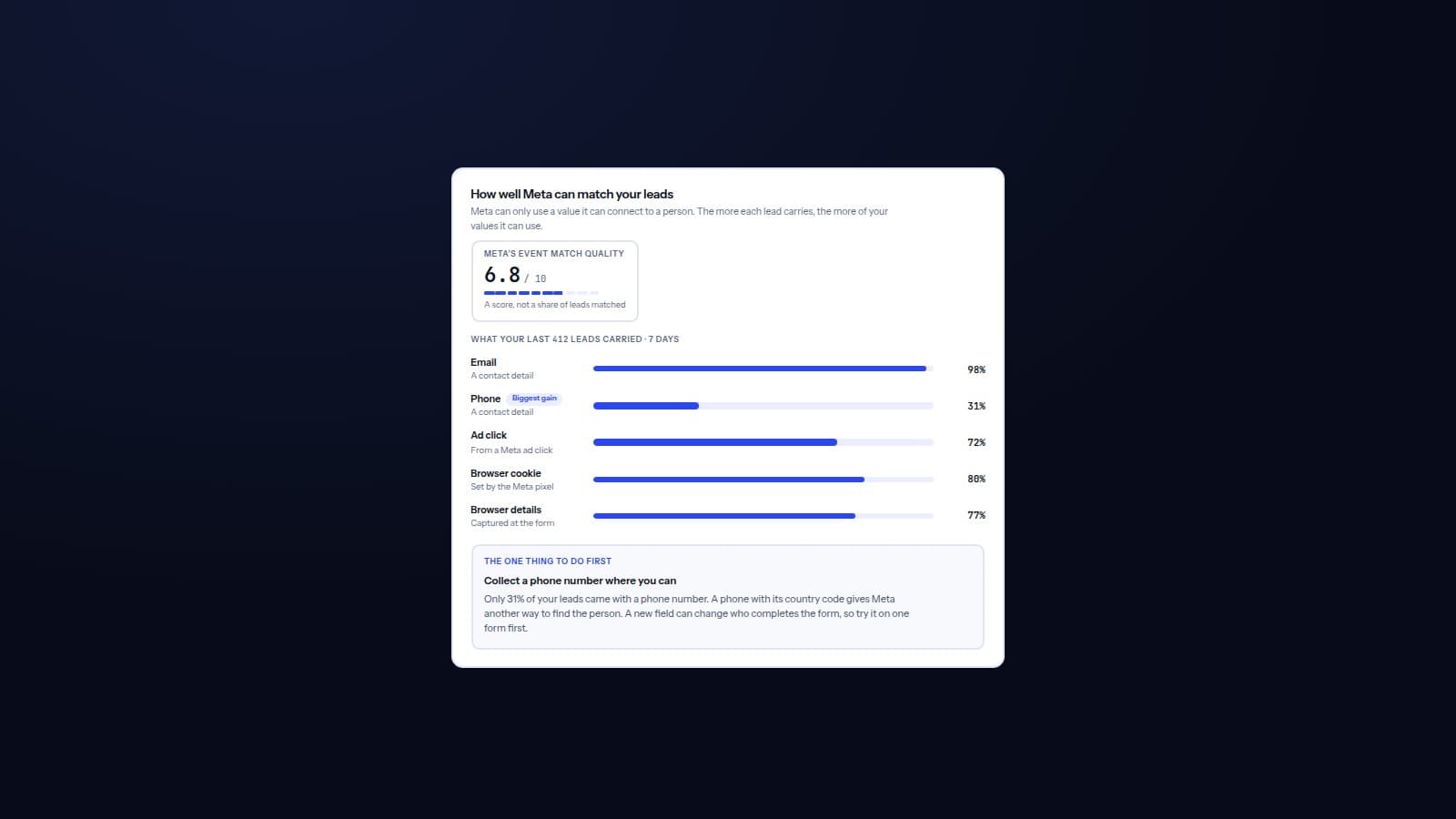
Lead Matching for Google Ads and Meta: Make Your Lead Values Count
A lead value only steers bidding when the platform can connect it to the advertising that produced it. The four checks between a send and a better bid, what to capture for Google and Meta, what Event Match Quality does and does not tell you, where matching breaks, and how to find your own largest gap.
Read article
 Meta
MetaBefore it can work
What your account needs
Four things have to be true, and the report checks every one of them against your own data. Run it either way: it will tell you which you are missing rather than leave you to guess.
30+conversions a month
Enough volume to learn
Per campaign, which is Google's own floor for value-based bidding. Below it Smart Bidding has too little to learn from, whatever you send.
1 yearof CRM history
Enough history to price on
Leads with what became of them, won and lost. Have less and nothing is refused: you get fewer signals priced, and the report names the ones it had to drop.
3×between low- and high-value leads
Real differences to find
Insurance, lending, legal, home services, education, B2B software. One product at one price has nothing for this to sort.
1way to match a lead
A click to match it back to
A Google click ID on the lead, or Enhanced conversions for leads switched on. Without one, values reach Google and attach to nothing.
Questions
Asked before uploading anything
Why bid on value instead of conversions?
Google can only optimise for what you tell it. Tell it every lead is worth the same and it buys the cheapest ones. Tell it what each lead is likely to be worth and it buys the ones that pay.
What if my account misses one of the four?
Run it anyway. The report measures all four on your own file and says which one you are short on, with the counts behind it, rather than refusing at the door. Volume and history are the two that usually need time; matching is usually a setting.
The suitability test, in the guideWhat does my CRM export need to contain?
Every lead from the period, not only the won ones, with a create date, a stage or status, an amount on the won deals, and a click ID or an email to match on. At least 25 closed deals. At least one signal that tells leads apart when they arrive is what turns a flat value into a model.
The full checklist, and the ten-minute fixesWhere do the values come from?
From your own history: how often each kind of lead closed, times what it was worth when it did. AI reads your file and your description. It never sets a number.
Whether your CRM data can support itWhat happens in my Google Ads account?
One conversion action is created, called VBB Lead Value, and each lead is sent to it with its own value. Nothing else is touched. Switching a campaign to value-based bidding is a change you make, and we show you where.
What has to be switched on in Google Ads?
One conversion action, which we create for you. If your leads carry a Google click ID, that is all. If we match on email instead, turn on Enhanced conversions for leads under Goals, Conversions, Settings, and make sure the Google tag on your site collects the email at the form. The Connect step tells you which case you are in.
How will I know it worked?
Once connected, the tool keeps reading your CRM and compares the leads Google buys after the switch against the ones before, measured in real outcomes, not in the numbers we sent.
How to measure the result, in the guideHow long before I know if it worked?
Three stages, and only the last one is slow.
Google re-learns first. Its own yardstick is up to around 50 conversion events or three conversion cycles, and a conversion cycle counts the delay before an imported conversion is reported. On lead-gen volume that is weeks, not days. Any significant change restarts it, and nothing inside that window is representative.
Which leads Google buys shows next. That is known the day a lead arrives, so the shift in mix is readable within weeks at normal volume. It is the first real evidence the bidding changed behaviour.
Whether those leads paid comes last, and it waits on your sales cycle. We hold that comparison until one and a half cycles have passed and 25 deals have resolved either side: on a 60-day cycle, 90 days is the earliest, not the estimate.
The evidence that arrives first, and its limitsSee what your own leads are worth
Upload a CRM export and find out whether your lead values vary, and by how much. About five minutes, and nothing is stored.