 Meta
MetaLead Matching for Google Ads and Meta: Make Your Lead Values Count

Alon Oszmann
14 October 2026
Accurate lead values need a reliable connection back to the ads.
A lead arrives. Your model works out what it is likely to be worth. Your integration sends that value to Google Ads or Meta, and the platform confirms it received it.
That confirmation does not tell you whether the platform matched the event to anyone, credited it to an ad, or used its value for bidding. A successful send can hide missing identifiers, a broken form mapping, or events that never become a usable signal.
Four separate checks
| Step | The question |
|---|---|
| Delivery | Did the platform receive the event? |
| Matching | Can it connect the event to a person, a browser or an ad click? |
| Attribution | Does the event get credited to an ad under the platform's settings? |
| Optimisation | Is the campaign set up to bid on that event and its value? |
Passing one does not prove the next. An event can be matched to a person without being credited to an ad. A conversion can show up in reports without being the one your campaign bids on. And sending a value does not by itself switch a campaign to value-based bidding.
Google Ads: keep the click identifiers, and set up enhanced conversions properly
Start by keeping the identifiers Google adds to the landing page address: the gclid, and on some iPhone journeys a gbraid or wbraid (sometimes alongside a gclid). Capture them before a redirect or a page change drops them, carry them through the form into your CRM, and send each under its own name. A gbraid sent as a gclid matches nothing. Where click IDs go missing, and how to fix each case.
Enhanced conversions for leads adds a second way to match: the email (or phone) a person typed into your form, scrambled before it is sent. Google uses it to match leads whose click ID was lost. Keep sending the click IDs as well.
It is more than a setting. Three things have to be true together:
- The setting is on in Google Ads: Goals → Conversions → Settings → Enhanced conversions for leads.
- Your website's Google tag collects the email at the form, so Google has something to compare your later upload with.
- The customer data terms are accepted in the same settings page.
A setting marked "on" is not proof the three work together. Submit a test lead, check its CRM record, and follow it through to Google's own diagnostics.
Meta: send accurate customer and browser details
Meta's Conversions API can take several kinds of matching information for a website lead:
- Email and phone, normalised and scrambled as Meta requires. Phone needs the country code.
fbc, which carries the Meta ad click, andfbp, which identifies the browser. Both are set by the Meta pixel, so the pixel stays on your site, and both are sent as they are, not scrambled.- The browser's details (user agent) and the page the form was on.
Two cautions. A browser cookie is not proof that a lead came from a Meta ad. And a missing fbc is not automatically a fault: someone who arrived directly, from search or from another channel was never going to carry one. Judge coverage on the leads that came from Meta ads.
Never invent identifiers to make a diagnostic look better.
What Event Match Quality does, and does not, tell you
Event Match Quality is Meta's score from 0 to 10 for the customer information sent with a particular server event. Meta documents it for website events sent through the Conversions API.
It is useful for finding gaps in what you send. It is not a percentage of leads matched, an attribution rate, or a measure of lead quality. A score of 6.8 does not mean 68% of your leads matched.
Check the score on the event your campaign actually uses, and read it next to your own identifier coverage and your CRM outcomes. A better score is a better measurement; whether it brings better customers is a separate question your CRM answers.
Where lead matching breaks
The failures are usually ordinary changes somewhere in the funnel:
- A redirect drops the address. The visitor reaches the page; the click identifier does not.
- A quiz or embedded form loses the context. The contact details survive; the click and browser details are lost between domains or screens.
- The CRM connection skips a field. The website captured it, but the integration never mapped it.
- A later visit overwrites the first. The CRM keeps the latest visit and loses what was true when the lead was created.
- The data is there but unusable. A phone without a country code, a wrong date, a placeholder like "test@test.com".
- A website change breaks one route. The old form still works while a new landing page quietly stops capturing.
That is why a test should end at the platform's diagnostics, not at the thank-you page.
Fix your largest verified gap first
There is no single order that fits every account. Start from your own leads:
- Compare the leads you should have sent with the events actually sent. Missing events come before matching.
- Check coverage by form and by source. An average across the site can hide one broken quiz.
- Check formats and field mappings. Present is not the same as usable.
- Check Google's enhanced conversions setup end to end: the setting, the tag at the form, the terms, the diagnostics.
- Read Meta's recommendations for the event you bid on, and fix what is missing or invalid.
- Test again after every change to forms, redirects, consent settings or the CRM connection.
A new form field, such as phone, may improve matching. It can also change how many people complete the form, and who. Judge the trade-off on qualified leads and customer value per visitor, not on the score alone.
Collect and send only what you are allowed to use. Scrambling changes the format of personal data; it does not change your responsibilities for it.
Browser and server events
If the pixel and the Conversions API report the same action, set up deduplication properly: Meta pairs them by event name and event ID. Do not assume a later server event enriches or replaces an earlier browser one.
When a lead's value is worked out after the form is submitted, which is the case in most setups, design the event flow around that timing: the event your campaign optimises on must carry the value and be counted once. ValueBasedBidding sends its valued event under its own name from the server for that reason, carrying the browser details captured at the form. How we set up the Meta event, and why.
Keep the numbers apart
- Identifier coverage: the share of leads carrying a given detail. You can count it yourself.
- Event Match Quality: Meta's score for the event.
- Attributed conversions: events the platform credited to ads.
- Business outcomes: qualified leads, customers and revenue in your CRM.
Each answers a different question, and none stands in for another. High email coverage with a weak score points at formats and validity. A coverage drop on one form points at that form. Better reporting without better customers points at the campaign, the offer or the sales process.
How ValueBasedBidding helps
ValueBasedBidding works out what each lead is worth from your own won and lost deals, and sends those values to Google Ads and Meta. It also shows you how well they can be matched.
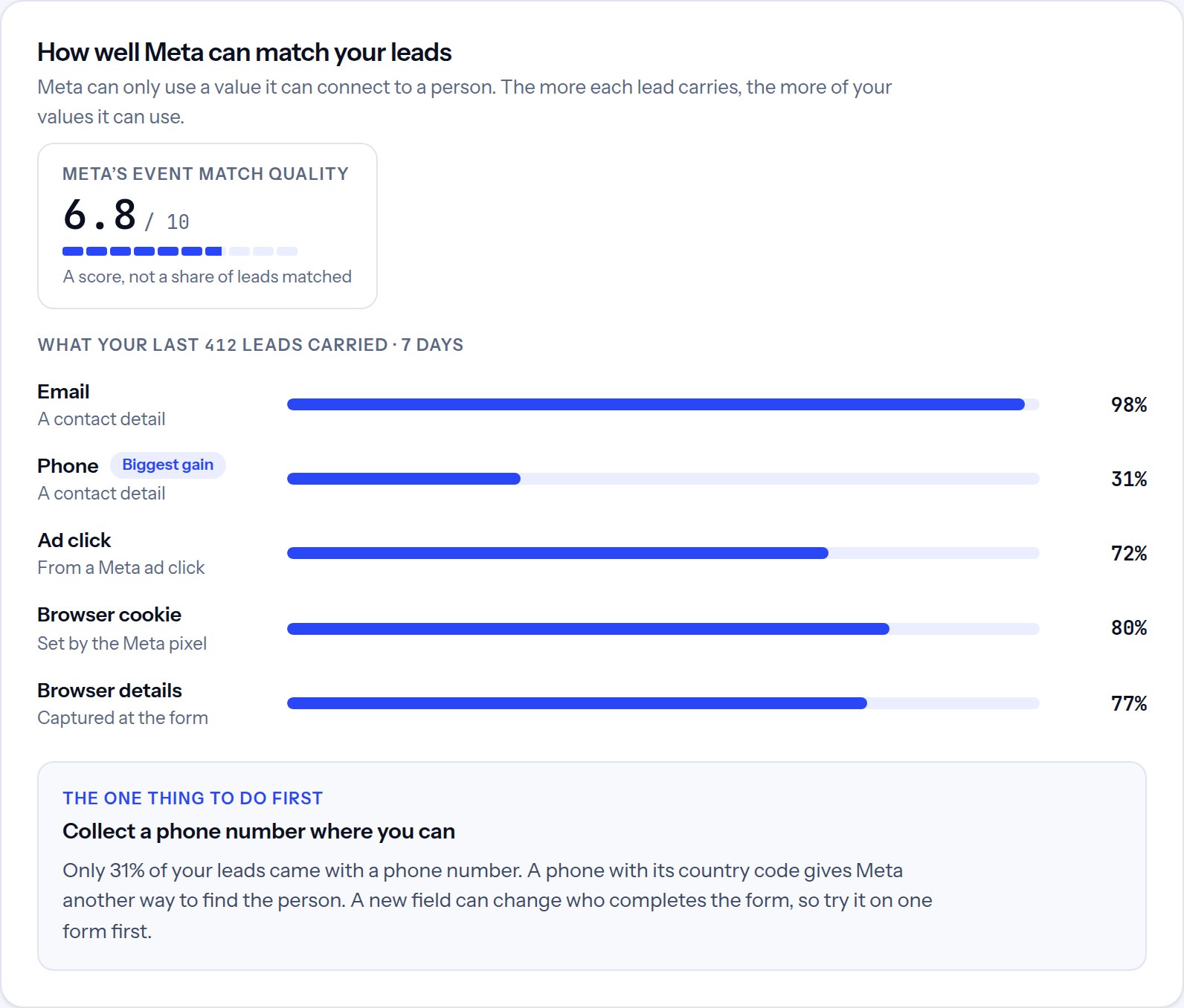
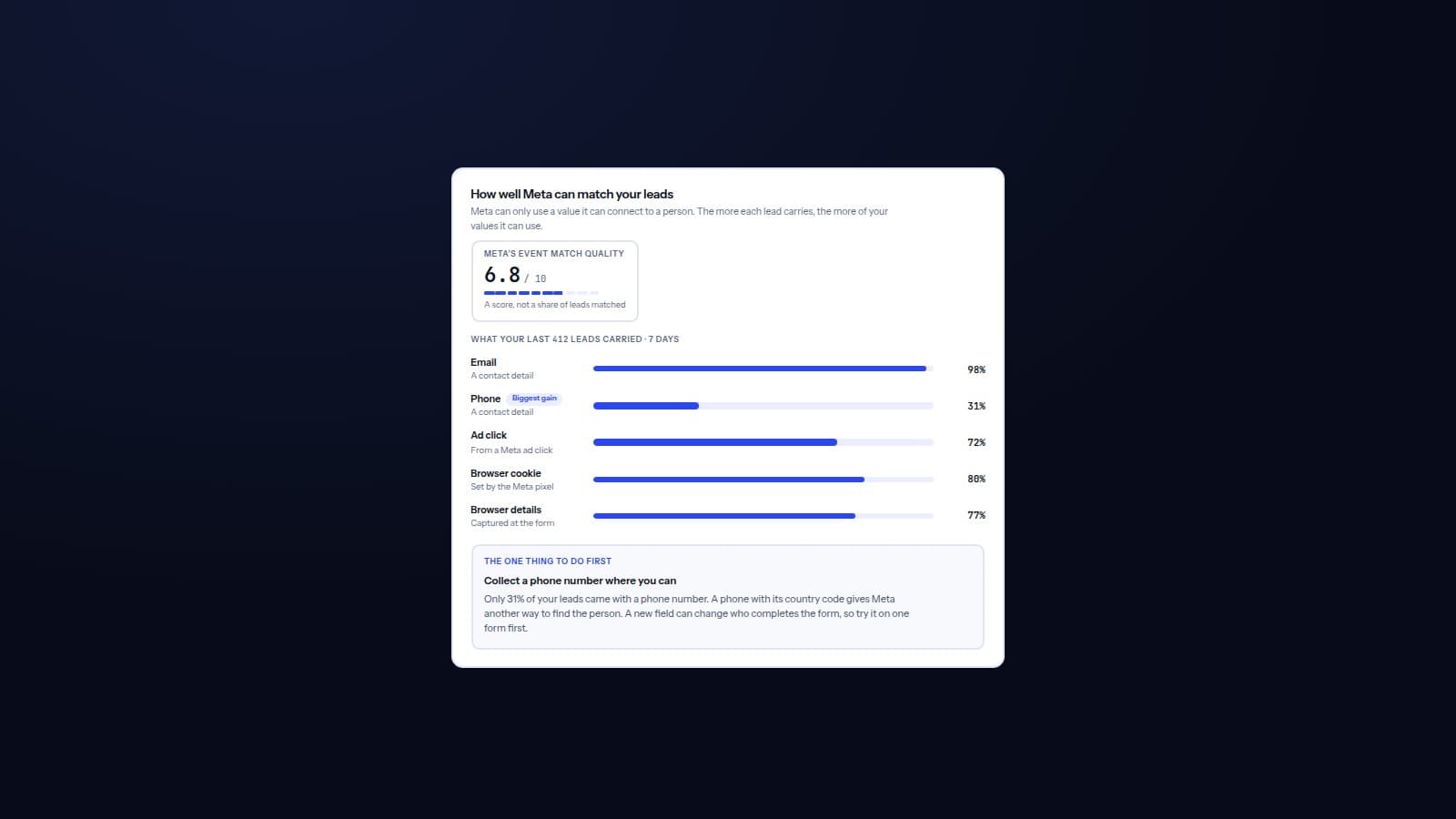
- For Meta, the workspace shows what the last week's leads carried (email, phone, ad click, browser cookie and browser details), counted from the events actually sent, next to Meta's own Event Match Quality where Meta reports it, and the one change most worth making first.
- For Google, it checks your enhanced conversions for leads setting in your Google Ads account, says how many of your leads have no click ID, and keeps the setup on your to-do list until it is done. iPhone click identifiers are sent under their own names.
These checks separate a delivery problem from a matching problem. They do not turn coverage into a match rate, and they do not promise better bidding. The final check stays in your CRM: did the leads you bought become better customers?
See what your leads are worth, or read the Meta guide and the Google click ID guide.
Common questions
Is a high Event Match Quality score enough? No. It says nothing about attribution, campaign setup or customer quality. Read it with the diagnostics and your sales outcomes.
Should every lead have an ad click identifier? No. Direct and organic leads will not. Watch the routes where one should be present.
Do business email addresses match worse? They can, because a work address is often not the one someone uses on Facebook or Instagram. Treat that as a possibility to check in your own data, not a rule.
Does sending a lead value change bidding by itself? No. The campaign has to be set up, and eligible, to bid on that event and its value.
What should I check first? Submit a test lead through a real form. Confirm the CRM receives the fields, that they are sent, and that the platform reports no errors. Then check your recent real leads: one test cannot show ongoing coverage.