 Meta
MetaHow ValueBasedBidding.com Works: From CRM Export to Better Bids

Alon Oszmann
27 September 2026

Your leads are not all worth the same. This is how we work out what each one is worth, and how that number reaches your ad account.
Right now your ad platform most likely counts every form fill as one identical conversion, so it bids the same on a buyer with a budget as on someone just browsing. ValueBasedBidding.com reads your own sales history, works out what each kind of lead is worth, and sends that value with every new lead. Google Ads and Meta can then spend more on the leads that tend to become customers.
You can try the whole thing on sample data before you use your own. The screenshots below come from that sample, and the last step from a simulated account, so none of it is a real company's data.
Before you start
- About a year of leads in your CRM, with the ones you won and lost marked, and an amount on each won deal.
- The ad click reaching your CRM with each lead. Step 7 checks this for you.
- Around 30 conversions a month per campaign, so the ad platform has enough to learn from.
Step 1: Tell us about your business
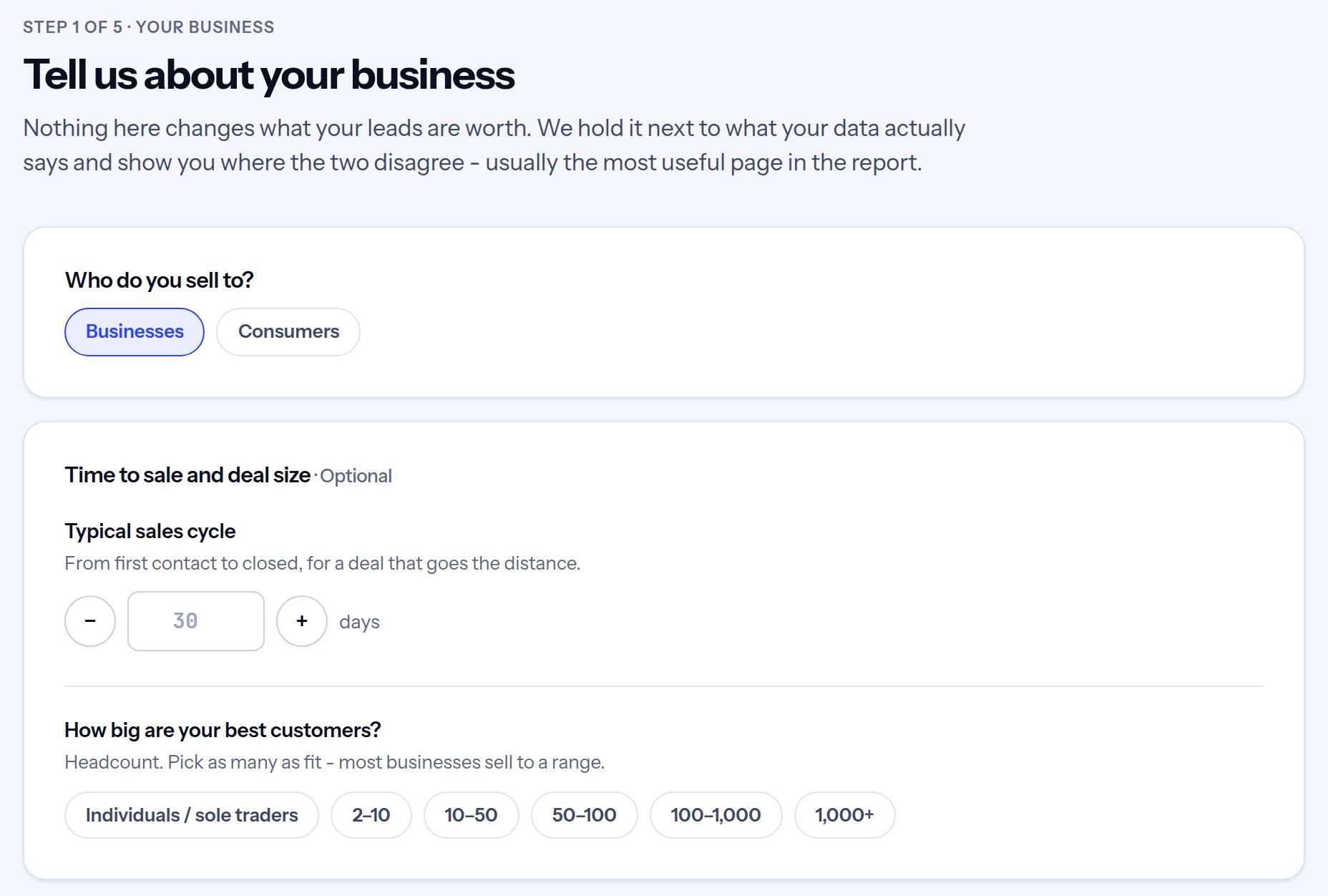
Choose whether you sell to businesses or to consumers. That decides which signals we look for in your data. The other questions are optional: your sales cycle and a few words on what makes a good lead. AI turns those words into claims, and the report tests each one against your data and shows you where the two agree and where they don't. It is often the most useful page in the report.
Step 2: Load your leads
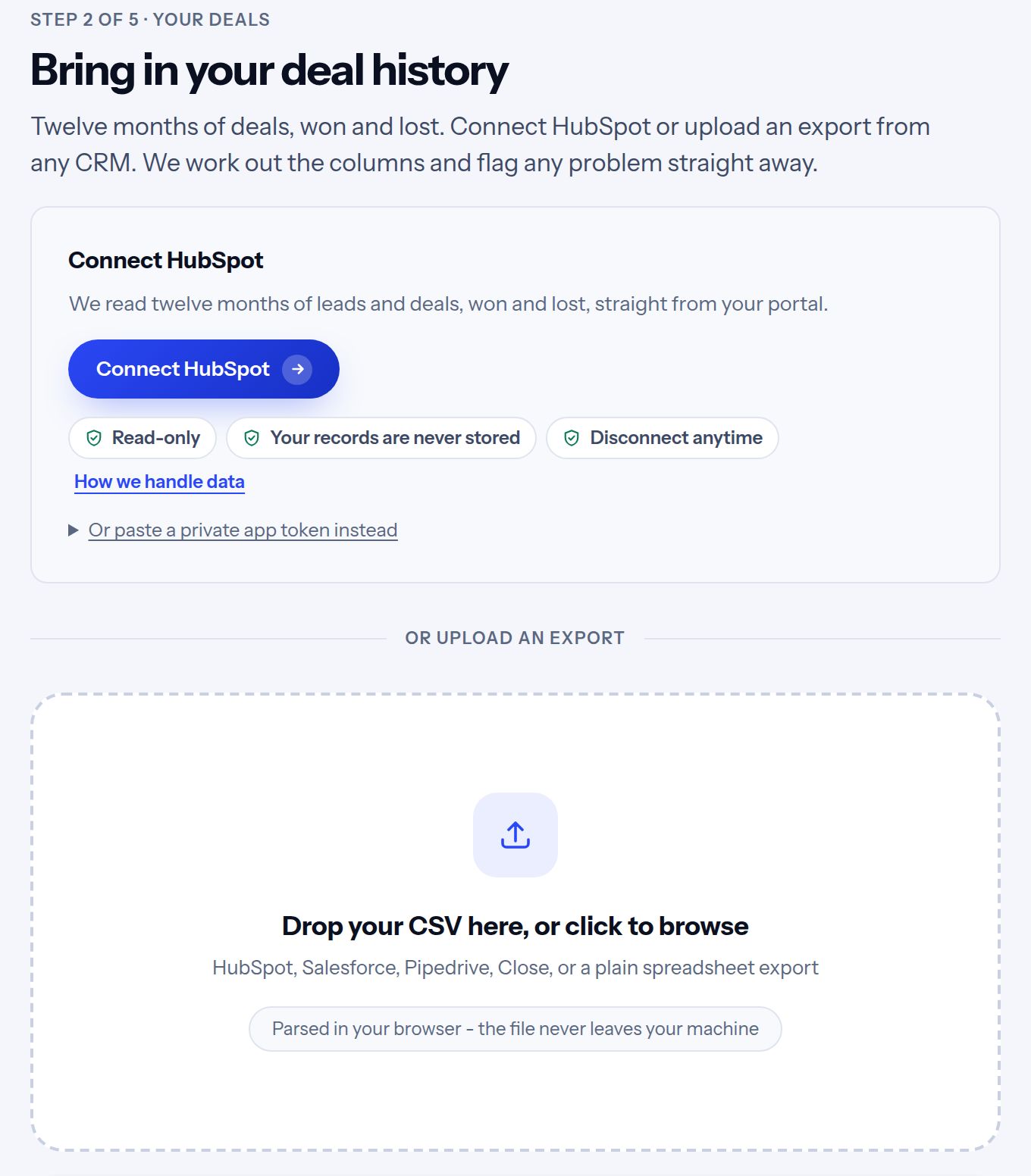
Connect HubSpot in one click, or upload an export from any CRM: Salesforce, Pipedrive, Close, or a spreadsheet you keep yourself. What we need is your leads from the last year or so, with the ones you won, the ones you lost, and what each won deal was worth.
A file you upload is read in your browser and never leaves your computer. The HubSpot connection is read-only and never stores your records.
Step 3: Check the columns
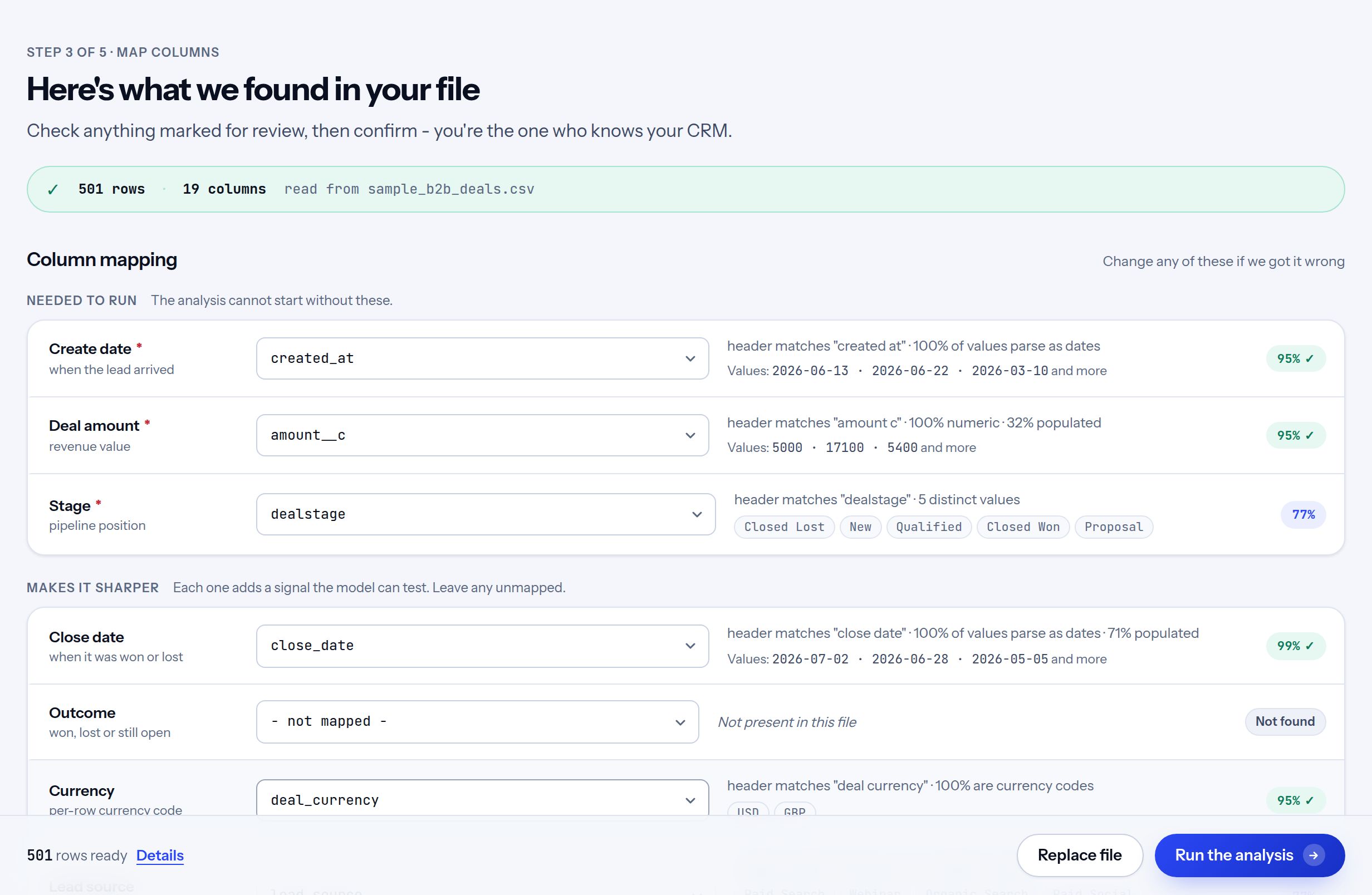
AI and our own checks work out which column is the date, the deal amount, the stage and so on, and what each of your status words means: a sale, a loss or still open. Every match shows why it was made, and you can change any of them. If you have a free-text column, such as form messages, you can switch on AI sorting for it here. We also tell you whether the file has enough in it to go on. Then click "Run the analysis". The first time, we ask for your name and work email. There is no password.
Step 4: See what your leads are worth
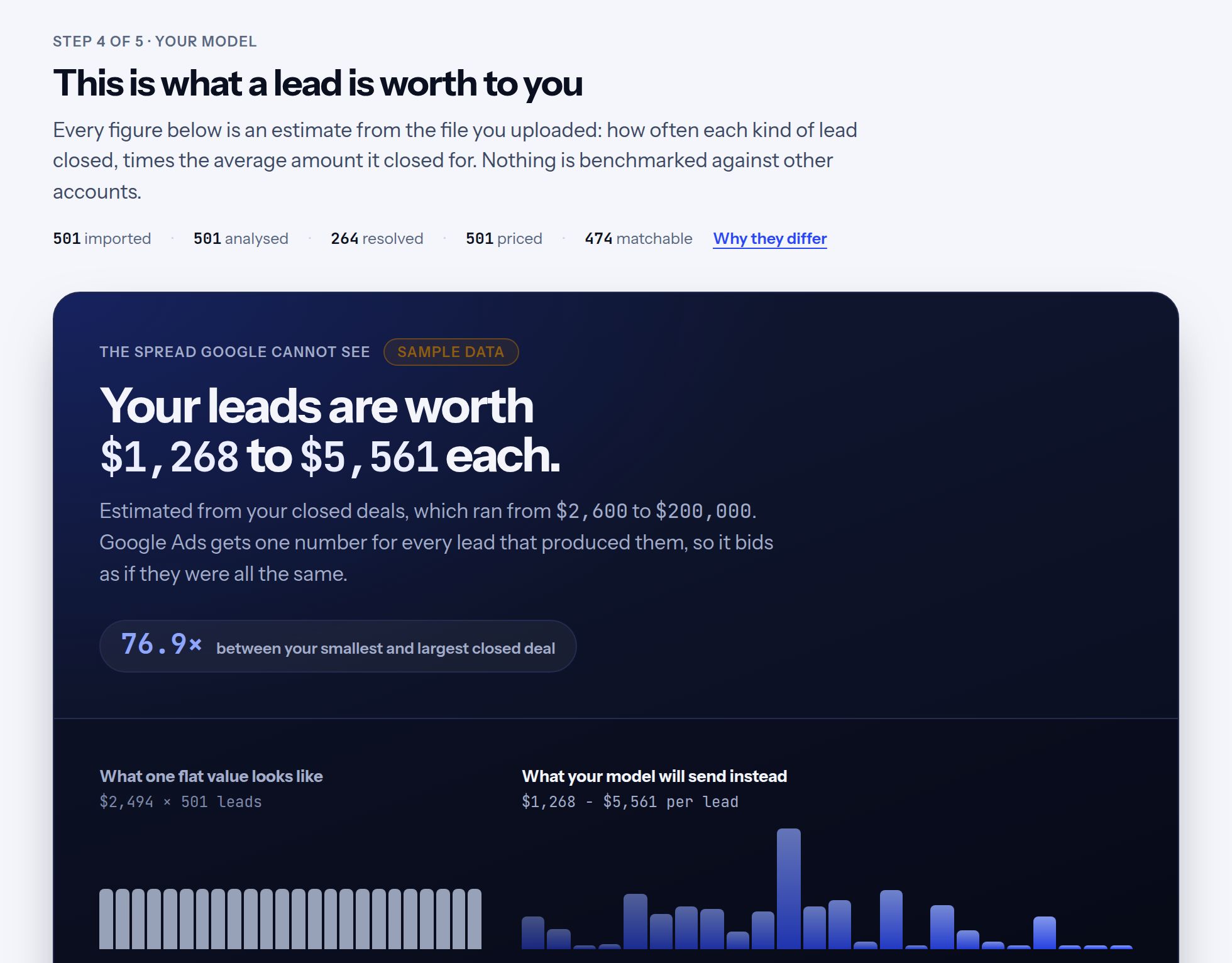
This is the heart of it. Every lead gets a value: how often leads like it closed in your history, times how much they closed for. The chart shows the difference. Today your ad platform sees one flat number for every lead (left). With values, it sees which leads are worth more (right).
Step 5: See how every value was built
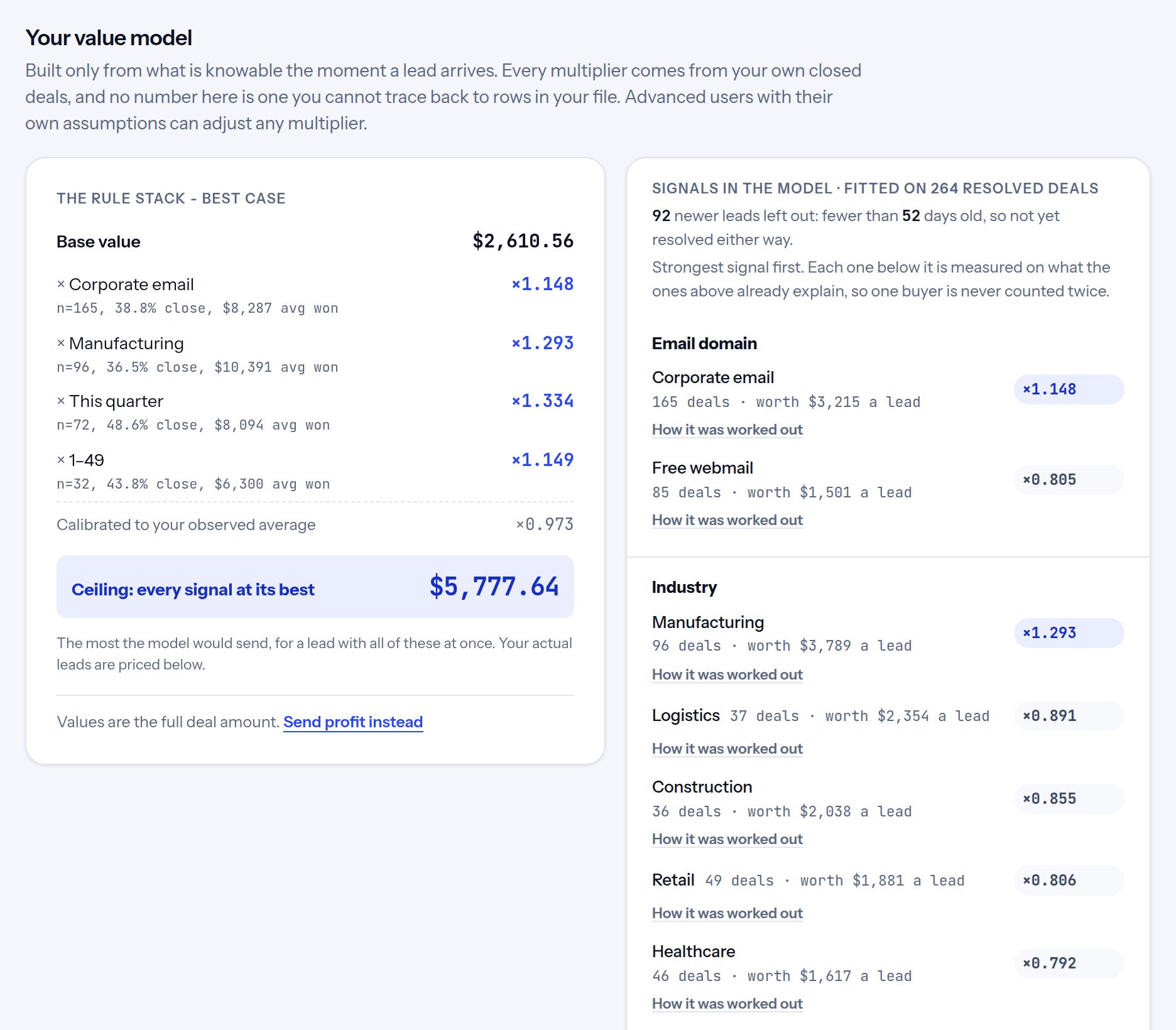
Every value comes from your own deals, and you can see exactly how. It starts from a base value, then adds a multiplier for each thing that made a real difference in your history, such as company size, industry or how soon the lead wants to buy. Each multiplier shows how many deals it rests on and how it was worked out. AI helps read your CRM, but it never sets a price: every value comes from your closed deals, so each one can be explained in a sentence.
Nothing is kept on a hunch. A signal is used only when enough deals stand behind it and it clearly separates good leads from weak ones. The others are tested, left out and listed with the reason. A figure that rests on fewer deals is pulled toward your average, so a small sample can't overprice a lead.
Save the model and new leads are priced the same way every day, so a value doesn't change just because you uploaded a fresh export.
For advanced users: if you have your own assumptions or an existing model, you can type over any multiplier. The rest of the model rebalances so your overall average still matches your data, and one click brings back what the data said.
Step 6: Send the values to your ad account
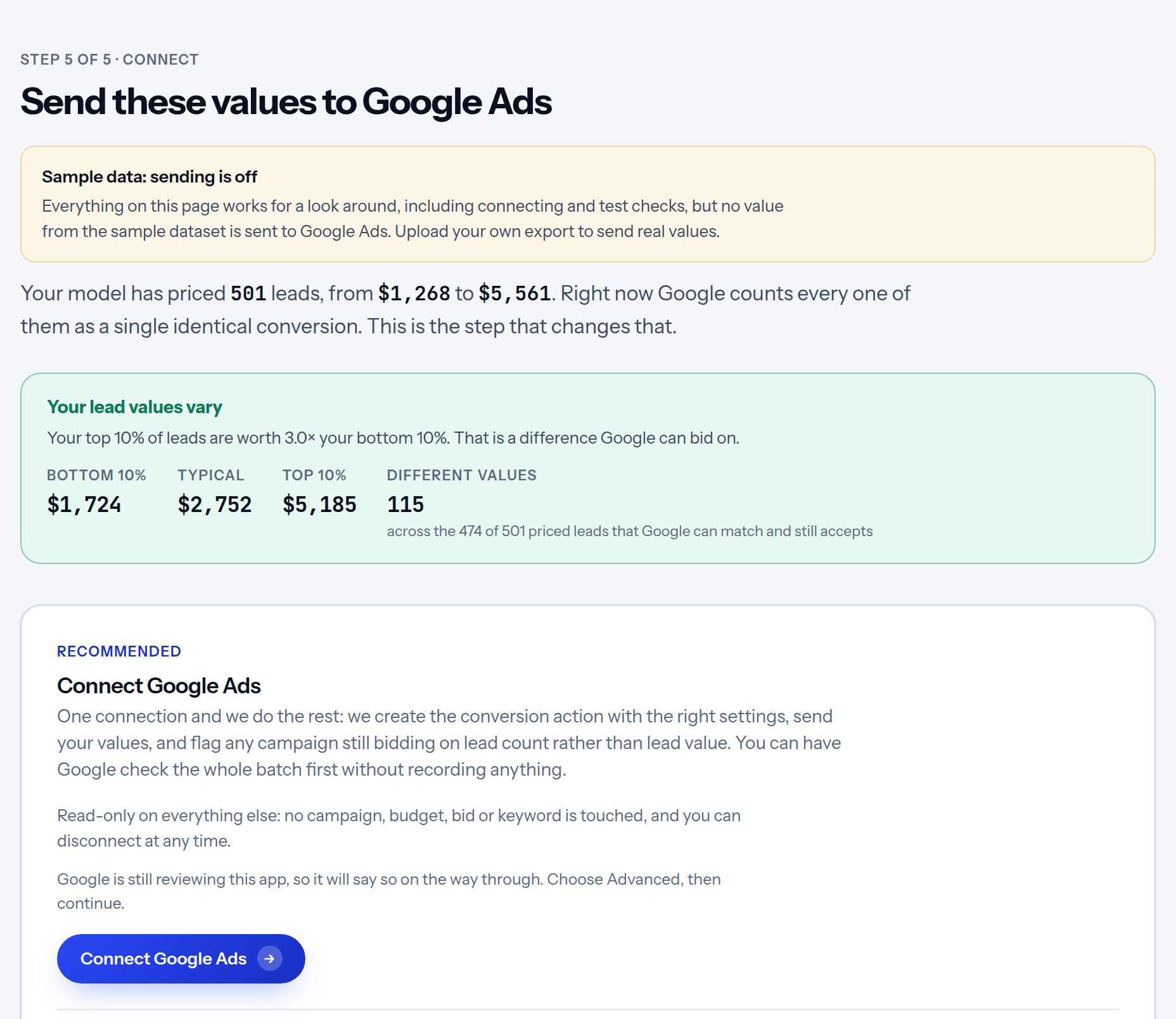
Connect Google Ads or Meta once. We create the conversion action with the right settings and never touch your campaigns, budgets, bids or keywords.
A value counts for bidding when it arrives with the lead, so new leads should go out the day they come in. With HubSpot connected, that happens on its own as each lead arrives. Working from a file, upload a fresh export when you have new leads, and the saved model prices them.
If you would rather not connect, give Google a link to fetch the values on a schedule, or upload a file yourself.
Sending values doesn't change your bidding by itself. That happens in step 8, once step 7 has checked your site.
Step 7: Check your site keeps the ad click
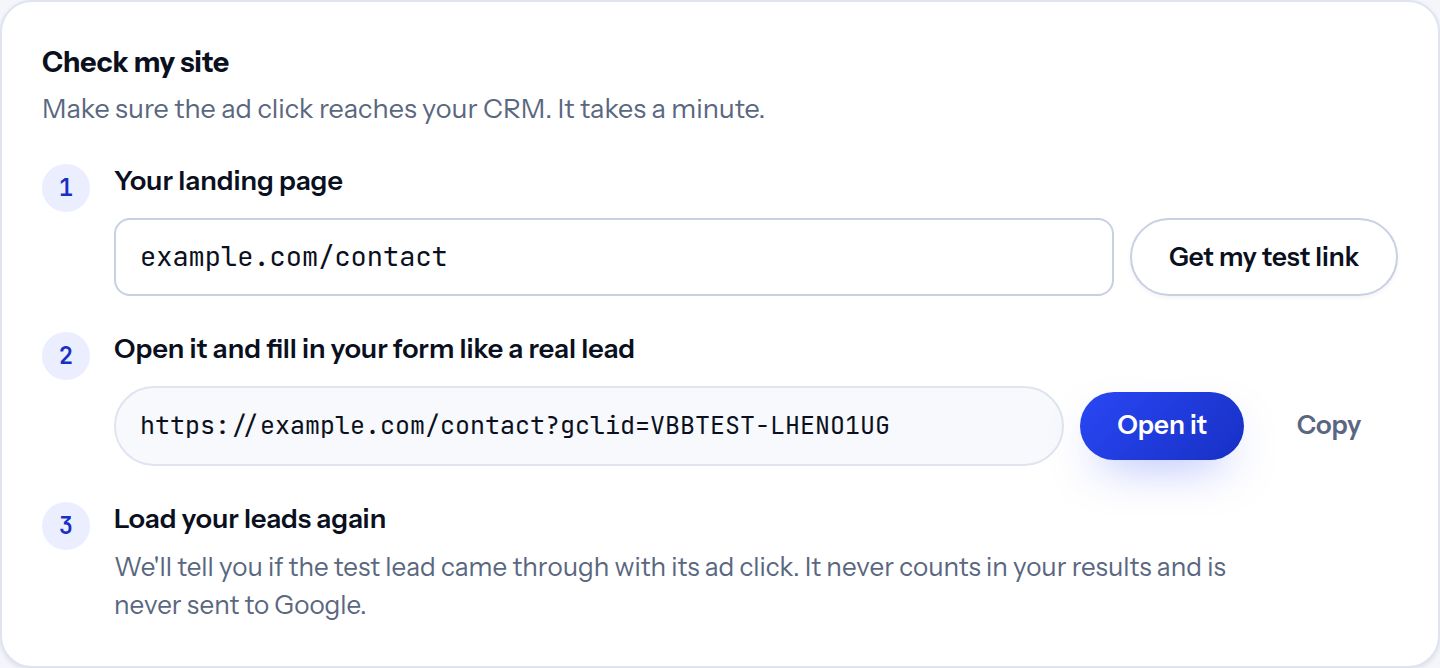
A value only helps if the platform can match it to the ad click that brought the lead in. So the click ID has to travel from your landing page, through your form, into your CRM. Enter your landing page, open the test link we give you, and fill in your form like a real lead. The next time you load your leads we tell you whether the test came through with its click. The test lead is never priced and never sent anywhere.
Do this before you switch your bidding. If the test lead arrives without its click, the usual causes are a redirect that drops it, a form that doesn't pass it on, or a CRM field nobody mapped. Our tracking script handles the form, and the click ID guide walks through the rest.
Step 8: Switch your bidding
This is the step that changes what the platform buys. Values arriving in your account change nothing until a campaign bids on them.
- Google Ads: make the value conversion primary and your old form-fill conversion secondary, on the same day, so no lead counts twice. Keep your current bid strategy for a few weeks while values build up, then move one campaign to Maximize conversion value, with no target at first. The migration guide walks through it in Google's own order.
- Meta: send values first and optimize for the valued event as a count. Meta offers its value goal for leads once it has seen about 100 valued conversions, with at least five different values, in 14 days. The Meta guide covers it.
Note the day you switch. The evaluation in the next step starts from it.
Step 9: See whether it worked
Once your campaigns bid on value, tell us the day you switched. The evaluation then answers the two questions that matter: did it improve your results, and were our predictions right? Both are judged on what your leads became in your CRM, never on what the ad platform reports, because the platform only repeats back the values we sent it.
The screenshots in this step come from a simulated account, built to show what a clear result looks like. Every figure on them was worked out by the same evaluation a real account gets, but the account itself is invented, and your own result depends on your leads, your market and your campaigns.
Did it improve results?
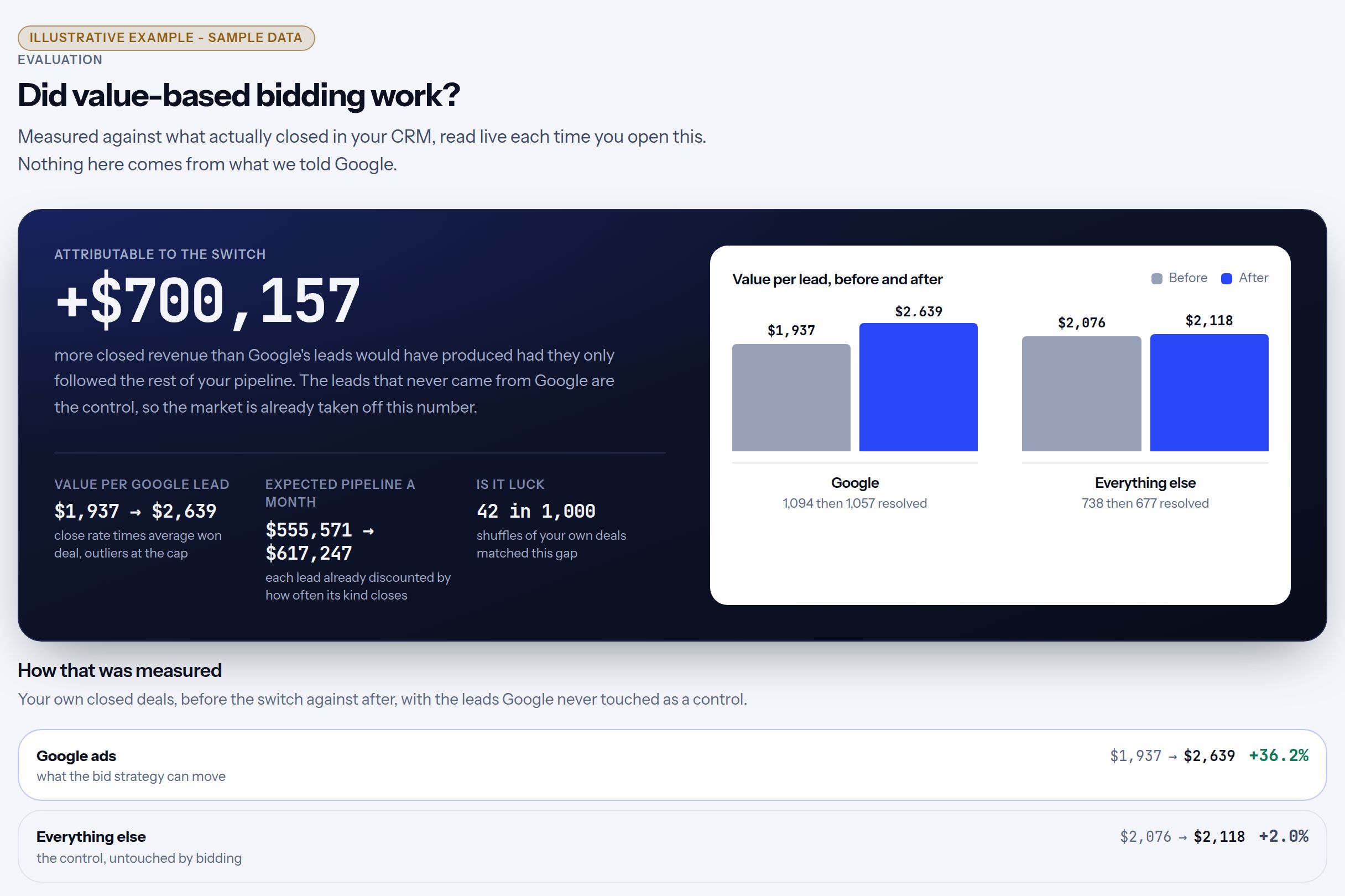
We compare closed revenue from Google's leads before and after the switch, and take off whatever changed for leads from other channels over the same time. That shows whether your results improved beyond the general trend, in money rather than percentages. Three things keep that number honest:
- A control group. Leads that never came from Google, such as referrals or organic search, can't have been changed by your bidding. If they got better too, that part is the market or the season, and it is taken off the result.
- A luck check. We shuffle your own deals into "before" and "after" at random a thousand times and count how often chance alone produces a gap this big. If it happens often, the result says so.
- Time to close. The first two weeks after the switch are left out while the platform learns, and until your leads have had time to close, the answer is "too soon to tell" rather than a guess.
Were the predictions right?
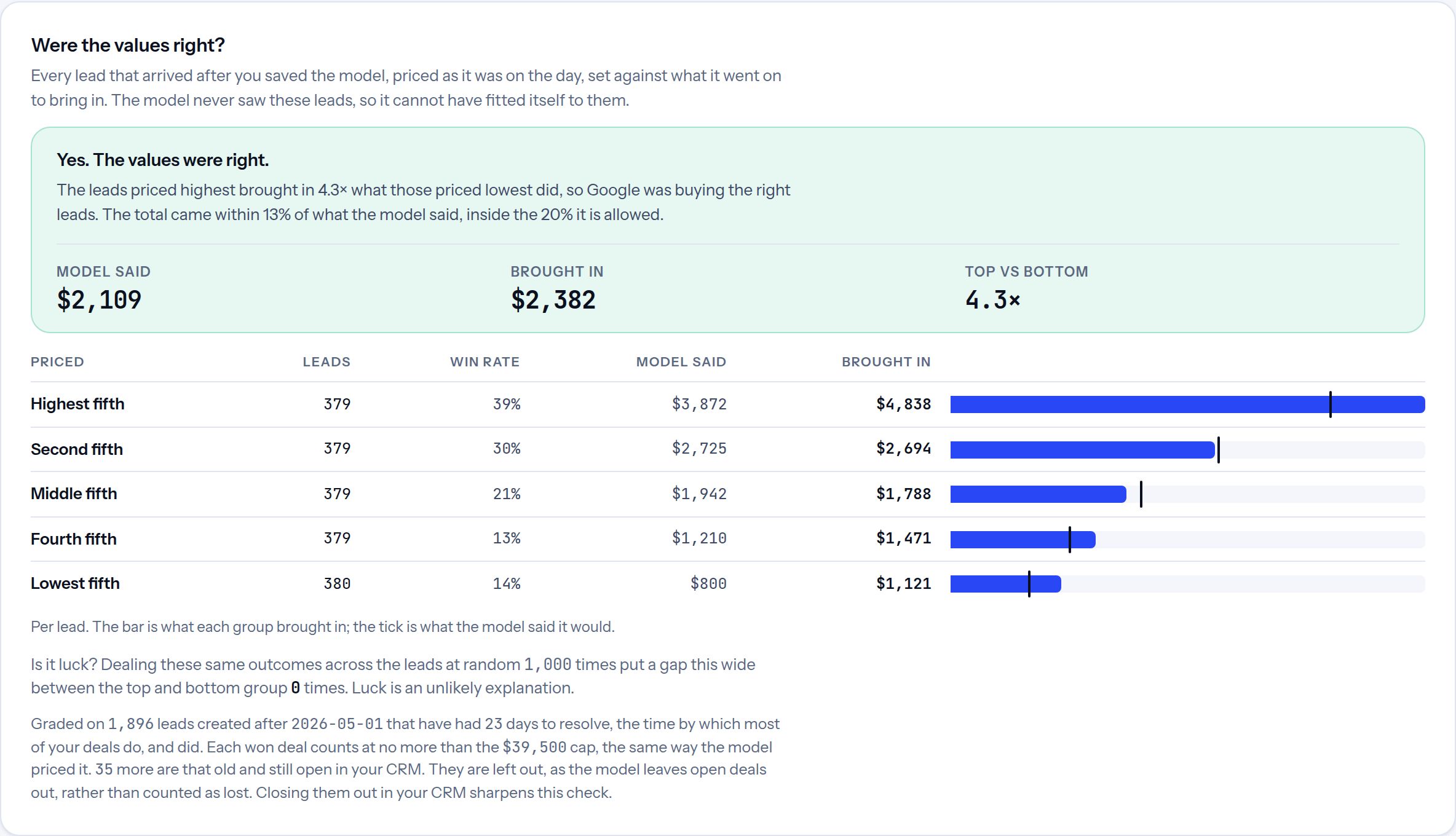
Every lead that arrived after you saved the model is sorted from highest priced to lowest, then set against what it actually brought in. Two checks, each with its own verdict:
- The order. Did the leads we priced highest bring in the most? That is what bidding needs most, because it decides which clicks the platform pays more for.
- The level. Did the total come close to what we predicted? If it drifts too far, the model is due a refit, and the evaluation says so.
The model never saw these leads, so it can't have fitted itself to them. And the same luck check tells you whether the gap between the best and worst leads could be chance.
One limit to keep in mind. This shows whether results improved beyond the trend, and whether the values predicted well. It can't prove the bidding caused the improvement, because something else may have changed for Google's leads alone, such as a new campaign or faster follow-up from sales. A campaign experiment in Google Ads, which splits the same traffic in two, is the stronger test.
What happens to your data
- An uploaded file stays in your browser. It's read on your computer and never uploaded to us.
- The HubSpot connection is read-only. We never write to your CRM, and your records are never stored.
- For each lead, we keep only what's needed to send its value: a hashed email (scrambled so it can't be read back), the ad click ID, the date and the value. Never names, deal amounts or notes.
- We also keep your saved model, your connections to Google, Meta and HubSpot (encrypted), and your name and work email.
- The AI never sets a value. An AI model helps match your columns, reading your description, the column names and short labels such as stage names. None of your leads are sent to it, unless you switch on the optional sorting of a free-text column.
More detail is on the security page.
Common questions
How much history do I need?
About a year of leads works best, with enough won and lost deals to compare. The report tells you if a signal doesn't have enough deals behind it, and leaves it out rather than guess.
Which CRMs does it work with?
Any CRM that exports a spreadsheet: Salesforce, Pipedrive, Close, Zoho, or one you keep by hand. HubSpot can also connect directly.
Do I need to change my campaigns?
Not to start. Send the values first and watch which campaigns bring the valuable leads. When you're ready, switch a campaign to bid on value. The migration guide walks through it step by step.
How long before I see results?
The ad platform needs a learning period after you switch, usually a few weeks for lead generation. Judge the result on qualified leads and closed deals once your leads have had time to close, not on cost per lead in the first week.
Try it on sample data
The quickest way to understand it is to click through it yourself. Start here and choose the sample dataset at the bottom of the first screen.